GridLay: precise grid overlays to copy photos onto paper
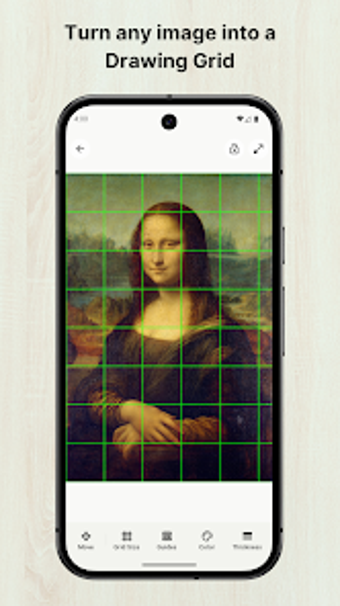
Overlay a customizable grid on any reference photo, match the grid to your paper size, and export a high-resolution gridded image for printing or tracing. GridLay: Grid Drawing from Veewa Labs targets traditional artists and hobbyists, offering canvas-matching tools, diagonal grid styles, cell labeling, and image filters to assist value studies. It fits art students and sketching hobbyists who practice proportion and scale through repeated, measured exercises.
Helps translate a photo into accurate paper grids
GridLay focuses on the classic grid method by letting you set specific numbers of rows and columns and adjust cell size, color, opacity, and line thickness. The app includes cell labeling and numbering to track progress across a drawing, and a lock reference feature that prevents accidental movement of the image while you trace or reproduce sections on paper. Those exact controls support step-by-step recreation of complex subjects.
Makes digital-to-physical alignment practical for studio and sketchbook work
The canvas matching tool lets you align the digital grid to common paper dimensions, ensuring the on-screen layout corresponds to your physical sheet. Export supports high-resolution output for printing, and image manipulation tools like crop, rotate, and flip let you position the reference before matching. These elements reduce manual measurement between phone or tablet and a sheet of paper.
Offers focused visual aids for value and line work
Built-in filters include Grayscale and Sketch modes to highlight values and reduce visual noise when you study light and shadow. Multiple grid styles are available, including standard lines, dots, and diagonal grids; use diagonal grids for angles and fine detail in portraits. The app’s feature set aims to support iterative practice rather than freehand digital painting.
Designed for quick startup on Android phones and tablets
GridLay is optimized for Android mobile devices to serve quick reference needs at a desk or on location. The interface concentrates on the drawing workflow, limiting distractions while you set grid parameters and export a printable reference. Accessibility specifics are not listed, so artists who require screen reader support or high-contrast modes should verify those needs within the app settings.
To sum up, it suits artists who practice measured drawing
To sum up, GridLay is a hands-on tool for artists and students who want precise, repeatable transfers from photo to paper; it emphasizes measured workflows rather than freehand digital drawing. Consider it if you practice proportion exercises regularly; consider alternatives if you need built-in voice guidance or explicit accessibility features. Pro tip: enable a high-opacity grid, export at high resolution, and print the reference at exact paper scale before you start tracing.